
reliability and logical clarity, which means it rarely rushes to an answer at the expense of correctness.Picture this: it’s 3:00 in the morning, you’ve been hunting down a stubborn memory leak for the past five hours, and your last three cups of coffee have done absolutely nothing to sharpen your focus. In 2026, nobody just opens a browser tab and searches Google anymore — instead, you spin up your AI pair programmer. But here’s the question that really matters: who exactly is riding shotgun with you at that hour? And more importantly, which AI tool are you actually trusting to get you out of trouble?
Recent industry data paints a fascinating picture. While a staggering 84% of developers now incorporate AI into their daily workflows, the community is nearly split down the middle when it comes to tool preference. Around 45% of working professionals have made the switch to Claude, drawn in by its reputation for surgical precision and deep reasoning, while ChatGPT continues to hold its ground as the most widely used AI tool on the planet, boasting over 800 million active users across the globe.
The conversation around ChatGPT vs Claude for coding has evolved well past simple syntax comparisons and basic autocomplete debates. In 2026, it has become a genuine battle of philosophies — Claude’s extraordinary one-million-token memory facing off against ChatGPT’s high-reasoning “Thinking” models built for intense logical computation. In this breakdown, we’re going to cut straight through the marketing noise and look at which tool actually helps real developers push production-ready code out the door faster and with fewer headaches.
What is Claude?
Claude is an advanced AI assistant developed by Anthropic, and while most developers are familiar with the name, fewer fully appreciate just how deliberately it was engineered. Unlike tools built primarily around speed and breadth, Claude was purposefully designed from the ground up to deliver thoughtful reasoning, carefully structured responses, and a deep, nuanced understanding of context. Its core architecture places a strong premium on
One of Claude’s most defining traits is its ability to process enormous volumes of information in a single pass while maintaining complete logical consistency throughout. This isn’t just a technical benchmark — it has real, practical consequences in development settings where the relationships between distant parts of a codebase must be understood holistically rather than in isolation.
Claude for Coding
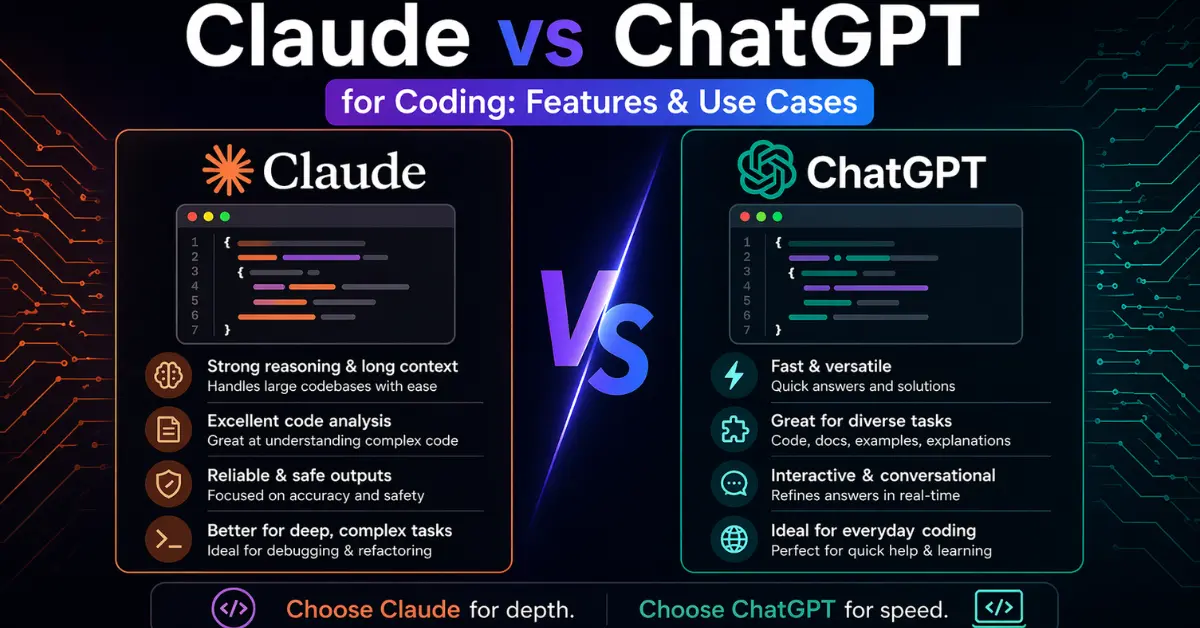
When it comes to actual development workflows, Claude earns its reputation through performance in code review, large-scale refactoring, and professional-grade documentation generation. In any serious discussion about Claude AI vs ChatGPT for coding, Claude is consistently recognized for its ability to analyze long, complex code files and return well-structured, thoroughly explained responses that treat developers like adults who want to understand the reasoning behind every suggestion.
Key Benefits of Claude for Developers
- Handles large codebases with exceptional efficiency, retaining full context across thousands of lines
- Provides detailed, transparent reasoning behind every suggestion it makes
- Produces clean, well-organized documentation that reads like it was written by a senior engineer
- Supports multi-language coding tasks without degradation in quality
- Demonstrates strong contextual understanding when working through complex logical challenges
Simply put, Claude is the ideal choice for developers who prioritize clarity, depth, and structured problem-solving over raw speed.
What is ChatGPT?
At this point, there is hardly a developer on the planet who hasn’t heard of ChatGPT. Built by OpenAI and powered by some of the most capable language models ever trained, ChatGPT was designed to understand natural language prompts, generate responses that feel genuinely human, and assist across an extraordinarily wide range of tasks — including the full spectrum of software development work, from writing initial boilerplate all the way through complex debugging and architecture conversations.
Over the past few years, ChatGPT has embedded itself deeply into the daily routines of developers and businesses that rely on generative AI integration services. Its speed, versatility, and increasingly rich ecosystem of integrations have made it the default starting point for millions of engineers around the world.
ChatGPT for Coding
Ask any developer who uses it regularly and they’ll describe ChatGPT as an on-demand coding partner that’s always awake and never impatient. In the ongoing discussion of Claude vs ChatGPT for coding, ChatGPT earns particular praise for its sheer speed, its hands-on debugging capabilities, and the quality of its practical implementation guidance. It supports an enormous number of programming languages, frameworks, third-party APIs, and DevOps workflows without breaking a sweat.
Key Benefits of ChatGPT for Developers
- Delivers fast, reliable debugging and error resolution with minimal back-and-forth
- Walks developers through problems with clear, sequential step-by-step guidance
- Excels at rapidly generating boilerplate code and comprehensive test cases
- Offers strong ecosystem integrations across the most popular developer tools
- Particularly helpful for developers learning new frameworks or onboarding into unfamiliar technology stacks
ChatGPT is built for rapid development cycles, experimental prototyping, and real-time coding assistance where speed and momentum matter most.
Key Features for Developers
When you’re in the business of building next-generation software, the AI tool you choose needs to complement your specific team’s workflow rather than force your team to adapt around its limitations. In 2026, the real debate between ChatGPT and Claude for coding and generative AI development isn’t simply about who can write a for-loop faster. It’s about the specialized, nuanced capabilities that serve genuinely different engineering needs and team cultures.
Claude — Developer-Oriented Features
Claude has carved out a clear and well-deserved niche for itself as the “thoughtful architect” of the AI assistant world. It’s particularly recommended for projects where precision, context retention, and technical depth are non-negotiable requirements.
Large Context Window: Claude’s capacity to process up to one million tokens in a single session is a genuine game-changer for developers working on large, multi-file projects. It can analyze an entire repository at once without losing track of relationships between distant modules, something that fundamentally changes how deep reviews and refactoring tasks can be approached.
Structured Responses: Claude consistently produces well-organized, markdown-formatted outputs that are easy to read, parse, and directly integrate into documentation or code review workflows. There’s a predictability to its structure that experienced developers genuinely appreciate.
Complex Logic Reasoning: Claude’s extended “Thinking” mode enables it to work through intricate architectural puzzles by methodically evaluating edge cases, potential failure modes, and design trade-offs before committing to any specific implementation approach.
Safe Handling: Claude’s Constitutional AI framework provides a higher level of guardrails around sensitive logic and proprietary code, making it a more comfortable option for teams working in regulated or security-conscious environments.
Clean Explanations: Rather than simply handing you a patch, Claude explains the underlying reasoning for every change it suggests — a feature that is invaluable for team learning, code reviews, and onboarding junior engineers who need to understand the why, not just the what.
Documentation Drafting: Claude has a natural talent for transforming disorganized, poorly commented legacy code into professional, comprehensive technical documentation and READMEs that read as though a thoughtful senior engineer wrote them from scratch.
Best For: Deep code reviews, refactoring legacy systems, high-level architecture discussions, and distilling sprawling technical specifications into clear, actionable summaries.
ChatGPT — Developer-Oriented Features
ChatGPT continues to serve as the Swiss Army knife for developers who need speed, versatility, and a deeply integrated ecosystem that lets them go from raw idea to running implementation in minutes rather than hours.
Strong Debugging: The specialized Canvas editor allows developers to highlight specific lines or blocks of code and receive real-time, inline suggestions for fixing bugs — a workflow that feels far more natural and efficient than copy-pasting back and forth.
Multi-language Support: ChatGPT’s vast and diverse training corpus makes it exceptionally dependable across nearly every programming language imaginable, from the most mainstream to the genuinely obscure.
Tool Integrations: ChatGPT slots naturally into the tools development teams are already using every day — GitHub, VS Code plugins, JetBrains, and a growing list of third-party platforms — without requiring significant workflow changes.
Step-by-Step Guidance: ChatGPT is particularly effective in a “tutor” role, walking developers through complex deployments, unfamiliar APIs, or new framework concepts in a clear, sequential manner that never feels condescending.
Improvement Suggestions: Beyond just generating working code, ChatGPT proactively identifies ways to make existing boilerplate more performant, more readable, and better aligned with modern best practices.
Test Case Generation: For quickly spinning up unit tests and generating edge-case scenarios across multiple code paths, ChatGPT is remarkably fast and thorough, helping teams build confidence in their production readiness.
API & SDK Examples: When you need to understand how a specific library works or want to see real usage examples for an unfamiliar API, ChatGPT surfaces accurate, contextually appropriate code examples with impressive speed.
Best For: Rapid prototyping, learning new frameworks, quick-fix debugging sessions, generating boilerplate code at scale, and handling the full range of DevOps scripting tasks.
Use Cases: Claude vs. ChatGPT in Real Development Scenarios
When developers build their AI strategy, the most important consideration is identifying where their specific bottlenecks actually live. In 2026, the choice between Claude vs ChatGPT for coding really comes down to whether you’re spending most of your time working through a massive existing codebase or racing to ship a new feature from zero to production. Here’s how both tools actually perform when the stakes are real.
Debugging Code: ChatGPT is noticeably quicker when it comes to catching syntax errors and offering immediate fixes through its Canvas editor. Claude, however, tends to behave more like a paranoid senior reviewer — slower perhaps, but significantly better at surfacing subtle logic flaws and security vulnerabilities that faster tools might gloss over, such as an unhandled edge case buried deep inside an authentication flow.
Large Codebase Review: This is where Claude has an undeniable and decisive advantage. Its one-million-token context window allows it to effectively read an entire project in a single session, giving it the ability to understand how a schema change might cascade through multiple layers and break a React component three folder levels away — a class of error that shorter-context models routinely miss because they simply can’t hold enough context at once.
Writing Clean Documentation: Claude’s natural writing style skews more structured, precise, and technical. It’s the go-to choice for generating comprehensive READMEs, full API documentation, and architecture guides that feel genuinely human-authored. ChatGPT, by contrast, is excellent at rapidly generating boilerplate comments, JSDoc summaries, and inline documentation at scale.
Learning & Tutorials: If you’re onboarding a junior developer or personally picking up a modern framework like Svelte 5, ChatGPT makes a genuinely fantastic tutor. Its Thinking mode breaks down not just how a framework works but why it was designed the way it was, offering a more conversational, encouraging, and ultimately more effective learning experience.
Complex Logical Problems: For high-stakes algorithmic challenges — such as optimizing a data processing pipeline that handles millions of records — ChatGPT’s o1-reasoning models currently set the standard. They invest meaningful time working through the logic before generating any output, which significantly reduces the likelihood of subtle errors slipping through in mission-critical code.
Claude vs ChatGPT: Feature Comparison Table
When evaluating Claude AI vs ChatGPT for coding in a practical context, looking at both tools side by side across the dimensions that matter most to working developers is the most reliable approach. Here’s a direct comparison across the features most relevant to real development work:
| Feature | Claude | ChatGPT |
|---|---|---|
| Developer Company | Anthropic | OpenAI |
| Coding Accuracy | High | Very High |
| Debugging Support | Strong reasoning | Faster practical fixes |
| Context Window | Very large | Large (model-dependent) |
| Documentation Writing | Excellent structure | Good but conversational |
| IDE Integrations | Limited native integrations | Strong ecosystem integrations |
| Multi-language Support | Broad | Broad |
| API Guidance | Strong | Very strong |
| Learning Support | Concept-heavy | Step-by-step friendly |
| Handling Long Files | Excellent | Good (may need chunking) |
Key Takeaways:
- Claude performs measurably better for structured reasoning and handling long, complex files
- ChatGPT delivers faster debugging and significantly stronger ecosystem integrations
- Both tools provide broad programming language support and reliable general coding assistance
Performance Comparison for Coding Tasks
When developers evaluate Claude vs ChatGPT for coding in real-world conditions, performance in actual tasks is typically the factor that tips the decision. Whether the focus is on code generation quality, debugging accuracy, refactoring capability, or system design support, how well these tools perform under real engineering pressure matters more than any marketing benchmark. Here’s a grounded comparison across the coding tasks that define most development workflows.
Code Generation Quality
Both Claude and ChatGPT are capable of generating production-ready code across a wide range of programming languages and paradigms. In the debate between Claude AI vs ChatGPT for coding on pure output quality, Claude tends to produce more structured, readable code that reflects thoughtful architectural decisions, while ChatGPT leans toward delivering faster, more immediately usable, implementation-focused solutions that prioritize getting something working quickly.
Error Detection & Debugging
ChatGPT is generally quicker to identify and address common syntax errors and runtime exceptions. Claude, however, offers deeper reasoning about the root causes of complex bugs and provides clearer, more educational explanations of why a particular piece of code is failing and what the most robust fix actually looks like at a systemic level.
Refactoring & Clean Code
Claude has a demonstrated strength in taking disorganized, legacy, or inconsistently structured code and reorganizing it into clean, maintainable, idiomatic implementations. ChatGPT is equally effective for quick performance optimizations and targeted efficiency improvements where you already understand the general shape of the solution.
System Design & Architecture
For high-level architecture conversations, Claude delivers detailed, well-reasoned analysis that helps teams think through trade-offs at a structural level. ChatGPT is highly effective for rapidly brainstorming practical approaches, exploring alternative implementation strategies, and thinking through the operational realities of different architectural choices.
Where Both AI Coding Assistants Fall Short
As we compare ChatGPT vs Claude for coding seriously and honestly, it’s equally important to understand where each tool struggles. Every AI assistant has genuine limitations, and knowing these gaps in advance helps set realistic expectations and enables developers to make smarter, more strategic choices about when to use each tool — and when to reach for something else entirely.
Claude Limitations
Fewer integrations in developer ecosystems: Claude currently lags behind in terms of direct IDE and plugin integrations, meaning developers who rely heavily on embedded tools inside their code editors may find the workflow less seamless than they’d like.
Sometimes overly verbose: Claude occasionally provides more detailed explanation than is strictly necessary for a straightforward fix, which can slow things down when you just want a quick answer.
May be conservative in coding suggestions: In certain edge cases and unconventional scenarios, Claude tends to avoid bold or experimental solutions, sometimes at the expense of more creative or innovative approaches.
ChatGPT Limitations
May hallucinate APIs with unclear prompts: When prompts are ambiguous or underspecified, ChatGPT can occasionally suggest methods, libraries, or API endpoints that don’t actually exist in the form described — a trap that can cost developers real time.
Context limitations depending on model tier: ChatGPT’s handling of very large files can require input splitting on lower tiers, introducing friction and potential loss of cross-file context in ways that Claude avoids.
Sometimes prioritizes speed over depth: The same instinct for quick, practical answers that makes ChatGPT so useful for prototyping can occasionally result in responses that lack the deeper reasoning and nuance that complex problems demand.
Understanding these limitations clearly is what separates developers who use AI strategically from those who rely on it blindly.
Pricing & Accessibility: Choosing the Right Plan for Your Development Needs
Beyond raw feature comparisons, pricing and accessibility represent genuinely critical factors — especially for startups operating under tight constraints, enterprise teams managing large-scale deployments, and growing tech organizations trying to find the right balance between cost and capability. Subscription tiers, API access, scalability provisions, and enterprise readiness all deserve careful consideration before any serious commitment.
Here’s a high-level overview of how pricing structures compare across both platforms:
| Plan Type | Claude | ChatGPT |
|---|---|---|
| Free Tier | Limited usage access | Limited usage access |
| Pro / Individual Plan | Monthly subscription | Monthly subscription (Plus) |
| Team Plan | Collaboration-focused pricing | Team-based subscription |
| Enterprise Plan | Custom enterprise pricing | Custom enterprise pricing |
| API Access | Usage-based pricing (per token) | Usage-based pricing (per token) |
| Context Window | Very large in advanced tiers | Larger in higher tiers |
Key Takeaways from the Pricing Comparison:
- Free-tier plans from both providers are well-suited for exploratory use and light experimentation
- Pro plans represent a solid investment for individual developers who require consistent, reliable access throughout their workday
- Team and Enterprise plans are designed for organizations that need collaborative features, enhanced security controls, and meaningful scalability
- API pricing for both tools is usage-based, meaning total cost scales naturally with volume and is therefore highly dependent on actual usage patterns
- Higher-tier plans on both platforms unlock significantly larger context windows and consistently better performance across demanding tasks
Ultimately, the right pricing decision depends on your project’s scale, how frequently your team reaches for AI assistance, and what level of ecosystem integration your workflow genuinely requires.
When to Choose Claude?
In 2026, Claude has emerged as the preferred tool for developers tackling high-stakes engineering work where structural integrity, logical precision, and long-context retention are genuinely non-negotiable requirements. Its design philosophy centers on meticulous, multi-step reasoning and expansive memory, positioning it firmly as the “Senior Architect” of the modern AI assistant world.
Large-Scale Repo Management: Claude’s ability to maintain coherent context across hundreds of thousands of tokens means it can effectively read your entire project at once, understanding dependency chains and cross-file relationships that shorter-context tools will inevitably miss. This makes it uniquely well-suited for ensuring that new code doesn’t introduce silent breakages in distant parts of an existing system.
Deep Debugging: For complex logic errors and the particularly frustrating class of “ghost bugs” that seem to defy explanation, Claude’s step-by-step tracing approach and thorough causal reasoning produce more reliable, more complete diagnoses than tools that default to pattern-matching guesses.
Clean, Idiomatic Code: Claude is widely recognized among experienced developers for writing code that reads the way a thoughtful human engineer would write it — proper naming conventions, modern best practices, clear logical structure, and a strong preference for maintainability over brevity.
Direct Terminal Interaction: Through Claude Code, the model can autonomously run tests, execute shell commands, and manage multi-file edits directly within your local development environment, moving it meaningfully beyond the chat interface and into genuine agentic territory.
Summary: Choose Claude for complex, multi-file projects where accuracy, architectural integrity, and long-term maintainability are the primary engineering values. Its massive context window and sophisticated reasoning capabilities make it the gold standard for full-stack engineering work and deep technical problem-solving in 2026.
When to Choose ChatGPT?
ChatGPT remains the undisputed champion of speed, versatility, and ecosystem breadth, functioning as the ultimate multi-tool for developers who need to move fast, experiment broadly, and stay embedded in a rich ecosystem of integrated developer services. In the continuing ChatGPT vs Claude for coding debate, developers consistently reach for ChatGPT when velocity, creative exploration, and tool integration matter most.
Rapid Prototyping & Ideation: ChatGPT’s near-zero response latency makes it perfectly suited for the early stages of any project — generating boilerplate code, testing quick ideas, finding clever workarounds, and maintaining the kind of momentum that keeps a prototype moving forward.
Massive Integration Ecosystem: With deep native support for VS Code, JetBrains, and GitHub, alongside increasingly capable Operator agents that can autonomously navigate browsers and local operating systems to execute multi-step tasks, ChatGPT fits naturally into virtually any existing development environment.
Multimodal Development: When development work involves generating visual assets alongside code, ChatGPT’s native integrations with image and video generation tools allow teams to create UI placeholders, marketing materials, and social media content without ever leaving the chat environment.
Interactive Learning & Debugging: The Canvas and Prism workspaces enable developers to edit code inline and view live previews of components or data visualizations in a split-screen environment — a workflow that feels genuinely interactive rather than conversational.
Summary: Choose ChatGPT for high-velocity tasks, creative brainstorming sessions, and projects that require rich multimedia output or deep integration with the broader AI tool ecosystem. It is the clear best choice for rapid iteration and “vibe coding” scenarios where the ability to move fast and leverage a wide range of integrated capabilities consistently outweighs the need for deep, multi-file architectural analysis.
Additional Factors Developers Should Consider
Real-World Developer Testimonials: In recent industry surveys, 85% of engineers reported that their approach to Claude vs ChatGPT for coding isn’t really about picking one and abandoning the other. The emerging best practice is to use Claude for complex refactoring and deep architectural work while relying on ChatGPT for rapid front-end prototyping and quick-turnaround tasks.
Benchmark Examples: Industry-standard evaluations like the SWE-bench Verified test show Claude 4.5 achieving 95% functional accuracy on realistic software engineering tasks, while ChatGPT 5.2 leads in polyglot performance across more than 50 niche programming languages — illustrating that both tools have genuine, measurable strengths in distinct areas.
Security & Data Privacy: Claude is frequently the preferred choice in regulated industries and security-sensitive environments, largely due to the built-in protections of its Constitutional AI framework. ChatGPT counters with robust Enterprise Zero-Retention modes designed specifically for teams working with proprietary codebases who need assurance that their code isn’t being used for model training.
Open-Source Ecosystem Support: OpenAI continues to lead in terms of community-driven plugin development and third-party integrations, while Anthropic is focused on building deep, high-quality integration with open-source terminal-based agents like Aider and the Claude Code CLI, reflecting a different but equally valid philosophy about how AI should embed in developer workflows.
Future Roadmap & Innovation: The next major frontier for both platforms is agentic workflows — a paradigm shift where your AI assistant doesn’t wait to be asked for help, but autonomously manages CI/CD pipelines, monitors for regressions, and deploys fixes in the background while you focus on building new features.
Final Verdict: Claude vs ChatGPT for Developers
After examining Claude vs ChatGPT for coding from every angle a working developer actually cares about — features, real-world use cases, known limitations, raw performance, pricing structures, and future trajectory — the picture that emerges is nuanced but clear.
Claude is the superior choice when your work demands structured reasoning, extensive context retention across a large codebase, and professional-grade documentation output. It thinks carefully, explains thoroughly, and produces code that a senior engineer would be proud to review.
ChatGPT is the superior choice when your work demands speed, creative flexibility, rapid debugging cycles, and seamless integration with the broadest possible ecosystem of developer tools. It moves fast, integrates everywhere, and keeps momentum high.
The honest answer in 2026 is that the developers shipping the best code aren’t choosing between these tools — they’re using both strategically, understanding where each one excels and routing their work accordingly. Unlocking the full potential of both requires more than casual experimentation; it requires a deliberate, structured approach to AI integration that aligns with your actual engineering goals and team workflow.