
Types of Web Applications and How They Serve Modern Business Needs
Every single day, without even realizing it, you interact with web applications constantly throughout your online activities.
You browse through products on your favorite eCommerce platform. You process a payment through a digital payment gateway. You compose and send emails through your mail client. You stream the latest shows and videos on entertainment platforms. You scroll through your social media feed, liking posts and leaving comments. And the list goes on far beyond just these examples.
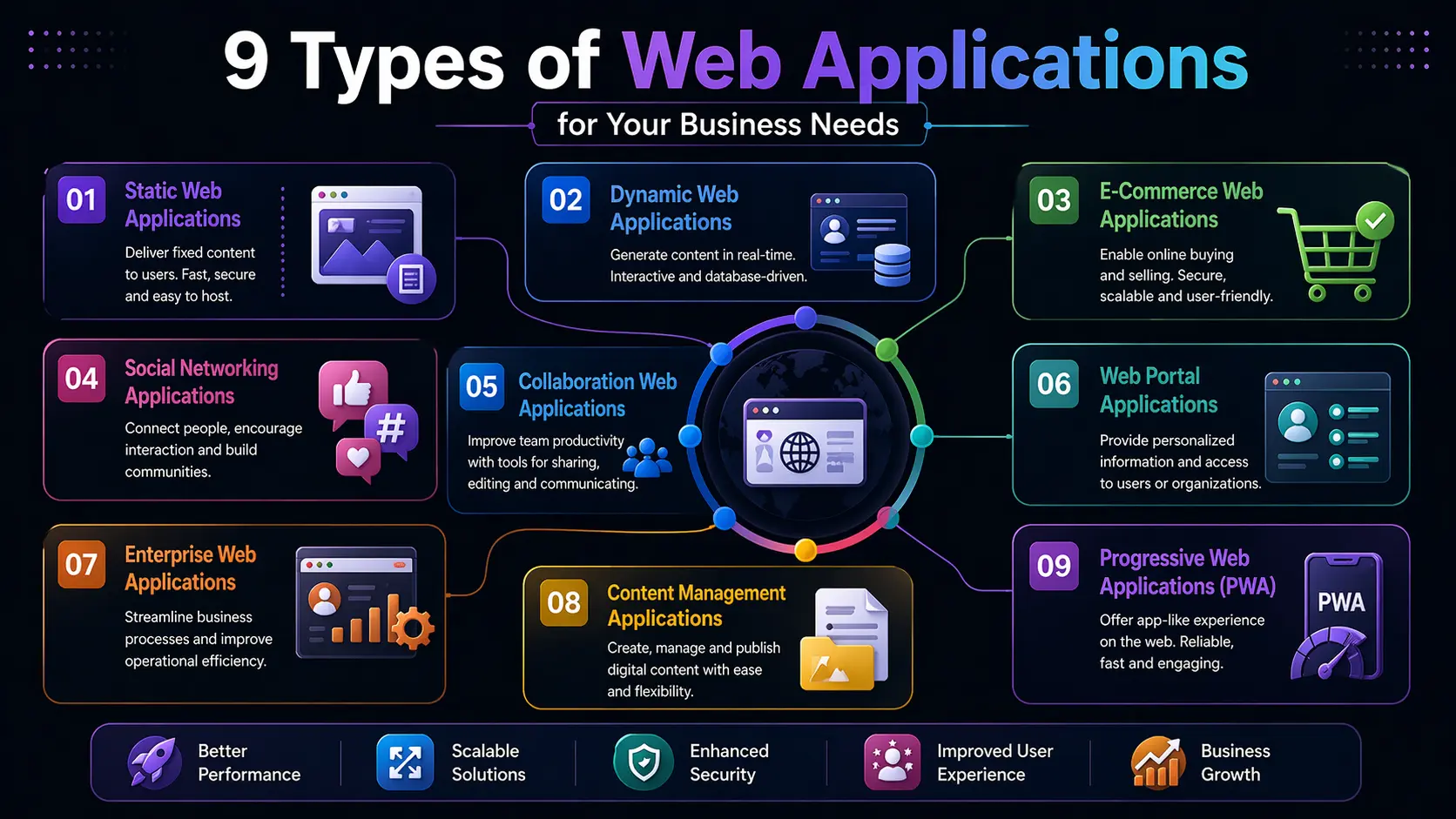
Each one of these everyday digital experiences is powered by a different type of web application. What sets them apart from one another is not just their purpose but also their underlying characteristics, architecture, and functionality. Businesses across virtually every industry rely on one or more of these application types to serve their customers, manage their operations, and achieve their objectives.
In this article, we will take a thorough look at the various types of web applications that exist today. But before diving into the different categories, let us first establish a clear understanding of what a web application actually is.
Defining a Web Application
A web application is a software program specifically designed to operate on the internet by making use of web-based resources. Unlike traditional desktop software, a web application is stored on a remote server rather than on your personal device. You access it through a web browser, interact with it by entering commands or performing actions, and the application responds by carrying out a specific task or delivering a particular result.
One of the most significant advantages of web applications is their versatility across operating systems. Whether you are using Windows, macOS, Android, or iOS, all you need is an active internet connection and a compatible browser to access any web application. Since there is no need to download or install anything on your device, you can discover and access web applications simply by searching for them on platforms like Google.
The Different Types of Web Application s
Static Web Applications
Static web applications are among the most straightforward types of digital tools available. They present a fixed set of content that does not change dynamically based on user behavior or server-side processing. This does not mean the content can never be updated — it simply means that making changes is a more involved and time-consuming process compared to other application types.
To modify content on a static web application, a developer must download the HTML source code, make the necessary edits manually, and then re-upload the updated files to the server. The changes only become visible once the page fully reloads. As a result, what the end user sees in their browser is essentially an exact mirror of what is stored on the server.
Static web applications can be built using a variety of programming languages and technologies, including HTML, CSS, and jQuery. They are perfectly capable of displaying rich media content such as images, audio files, videos, and promotional banners. However, personalization for individual users is quite limited, and the content update process can be cumbersome.
Because any dynamic behavior in a static web app is driven by client-side code rather than server-side logic, these applications tend to load and perform well even on slower internet connections. They are best suited for situations where user interaction is minimal and the information being presented remains relatively stable over time.
Ideal use cases: Digital portfolios, online resumes, lead capture landing pages, and informational sites for businesses such as book publishers.
Dynamic Web Applications
Dynamic web applications operate at a fundamentally different level of complexity. Unlike their static counterparts, these applications draw content from databases and refresh that content in real time based on user requests and interactions. When a change needs to be made — whether it is a product update, a news article, or a user profile modification — administrators can handle it directly through a content management system without ever touching the underlying server code.
The rendering process for dynamic web apps involves multiple layers. When a user requests a page, that request travels from their browser to a web server, which then passes it along to an application server. The application server generates the appropriate code and customizes the page according to the specific request before sending the response back through the web server to the user’s browser. This multi-step process enables a highly tailored and up-to-date experience for every individual user.
Dynamic web applications support a wide range of content management operations, including reading, updating, and deleting data. Programming languages such as PHP and ASP are commonly used to build them due to their strong content organization capabilities. Many of the most commonly recognized application types — including single-page apps, multi-page apps, and portal applications — fall under the broader umbrella of dynamic web applications.
Examples: Netflix, Facebook, and most modern social and streaming platform
Single-Page Applications
Single-page applications, commonly referred to as SPAs, handle their logic and processing on the client side — meaning within the user’s browser — rather than relying heavily on the server. These applications deliver a compact and focused experience, typically with less content volume than other application types, which makes them relatively quick to develop and straightforward to deploy.
The defining characteristic of an SPA is that the entire user experience unfolds on a single page. There is no full-page reload when users navigate between sections or trigger actions. Instead, content updates happen asynchronously in the background, delivering fast response times and an uninterrupted, fluid experience. This makes SPAs feel incredibly responsive and smooth to use.
Another advantage is that updating or restructuring the application is comparatively simple. The main drawback of SPAs, however, is their limited compatibility with traditional SEO best practices. Since much of the content is rendered dynamically through JavaScript rather than being embedded directly in the HTML, search engines can sometimes struggle to index SPA content effectively.
Examples: Gmail, Twitter, and Airbnb.
Multi-Page Applications
Multi-page applications, or MPAs, take the opposite approach to SPAs. In this architecture, the application logic resides on the server. Every time a user requests new information or navigates to a different section, the server responds by loading and delivering an entirely new page from its database. There is no inherent limitation on the number of pages or the volume of data an MPA can handle, making it a highly scalable option for large and data-heavy platforms.
The trade-off is that this constant page-loading process can be disruptive to the user experience. Each navigation action essentially resets the interface, which can feel less seamless compared to the fluid experience of an SPA. Development, updates, and ongoing maintenance also tend to take longer given the sheer scale of content involved.
On the upside, MPAs align naturally with SEO best practices. Because each page is a distinct, fully rendered document, individual pages can be optimized for specific keywords, making it easier for search engines to discover and rank the content. MPAs built on Ajax can even be made to function responsively as mobile applications without requiring a full page reload for every interaction.
Multi-page applications are the standard choice for large-scale online stores, marketplaces, and content-heavy platforms.
Examples: Trello, Google Docs, and CNN.
Portal Web Applications
Portal web applications are designed to give registered users access to a wide range of features, services, and sections from a central home page. Access is typically restricted to members who have created a profile and logged in, ensuring that the experience is personalized and secure. Navigation within a portal is inherently user-centric — the features and content a user sees are shaped by their specific role, preferences, and permissions.
Once logged into a portal, users can typically access a variety of tools and services in one place, such as real-time chat, financial transaction capabilities, email communication, discussion forums, and more. User activity within the portal is monitored, and access to certain features is controlled to maintain the integrity and security of the platform.
Portals are commonly developed and used by businesses, government agencies, educational institutions, and healthcare organizations that need to provide a structured, multi-functional digital environment to their users. The result is improved integration across services and stronger user engagement and retention.
Examples: Coursera, Udemy, and university digital learning platforms like Stanford’s online portal.
Rich Internet Applications
Rich internet applications occupy an interesting middle ground between traditional web apps and desktop software. They bring desktop-like functionality to the browser environment while simultaneously offering superior data communication, greater interactivity, and faster performance than conventional web applications.
One of the distinctive features of rich internet applications is their ability to function in offline mode, made possible through client-side plug-ins such as Flash or Silverlight. They are built using technologies like Java, Adobe Flex, Ajax, JavaFX, and Google Gears, all of which contribute to their high level of interactivity and visual richness.
These applications deliver outstanding data visualization and keep item synchronization well under control, making them ideal for tools that need to present complex information in an engaging and intuitive way. The main vulnerability is their dependence on plug-ins — if a plug-in becomes outdated or unsupported, the application’s functionality can be partially or entirely compromised.
Examples: YouTube and Google Maps.
eCommerce Web Applications
eCommerce web applications are the digital storefronts that power online retail. They bring the entire shopping experience onto the web, allowing businesses to reach a vastly wider customer base than any physical store could and giving consumers the convenience of shopping from anywhere at any time.
These applications integrate a complex array of systems to function smoothly — inventory management, order tracking, multiple payment processing options, user authentication, and customer-friendly interfaces all work together behind the scenes. This integration is what makes eCommerce web applications some of the most technically complex applications to build and maintain. Developers typically build sophisticated management dashboards into these platforms to give store owners full visibility and control over their operations.
Examples: Amazon and Flipkart.
Content Management Systems
A content management system, or CMS, is a web application designed specifically to make the creation, editing, and management of digital content as simple and accessible as possible. Unlike traditional web development where every content change requires editing raw code, a CMS provides a user-friendly interface that allows even non-technical users to publish and update content with ease.
CMS platforms are generally less expensive to work with and more approachable for developers and content creators alike. They are widely used for building and maintaining company blogs, personal websites, news portals, and a variety of other content-driven digital properties. The ability to manage everything from a single dashboard — without needing to write or upload HTML files manually — makes CMS platforms an incredibly practical solution for ongoing content operations.
Examples: WordPress, Joomla, and Drupal.
Progressive Web Applications
Progressive web applications, or PWAs, represent the cutting edge of web application development. They are essentially advanced evolutions of single-page applications, designed to deliver an experience that closely mirrors that of a native mobile app — all through a standard web browser.
PWAs are built using the latest browser APIs, enabling features like home screen installation, intelligent caching, and optimized data transfer through HTTP/2. These capabilities mean that PWAs remain functional and accessible even when the user is on a slow or unreliable internet connection, and can even offer offline support in many cases.
One of the biggest practical advantages of PWAs is that users do not need to visit an app store, download anything, or manually install updates. The experience is seamlessly integrated into the browser, making it effortless for users to access and use the application.
Examples: Spotify, Starbucks, and MakeMyTrip.
Choosing the Right Web Application for Your Business
Having explored the full spectrum of web application types, it becomes clear that there is no single solution that fits every business. The right type of web application for your organization will depend on the nature of your industry, the expectations and habits of your target audience, the complexity of the functionality you need to deliver, and the long-term direction you want your digital presence to take.
Each application type offers distinct advantages and comes with its own set of considerations. What matters most is aligning your choice with your specific business goals rather than simply going with the most popular or most technically impressive option. Taking the time to clearly define your requirements before committing to a development path will save considerable time, resources, and frustration down the line.