
In today’s fast-moving software world, building an application is only half the job. Running it reliably across different environments—development, testing, and production—is equally important.
Docker has become a standard tool used by startups, enterprises, and product-based companies to build and deploy applications faster and more reliably.
What Is Docker?
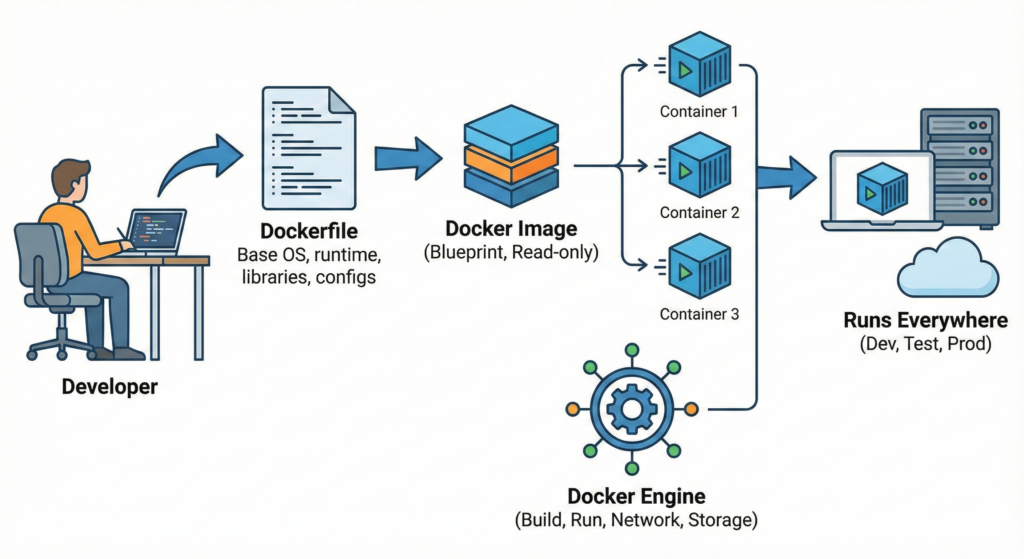
Docker is a tool that packages an application along with its dependencies into a container.
A container ensures that the application runs the same way:
- On a developer’s system
- On a testing server
- In production
In simple words:
Docker ensures that an application runs the same way everywhere.
Why Docker Is Used
Without Docker:
- Applications behave differently on different machines
- Server setup is manual and error-prone
- Deployment takes more time
With Docker:
- Applications run consistently
- Setup becomes faster
- Teams collaborate more easily
This is why many companies rely on Docker.
Core Docker Concepts
1. Docker Image:
A Docker image is a blueprint that contains:
- Application code
- Required libraries
- Runtime environment
Docker Image = Blueprint (static, read-only).
2. Docker Container:
A Docker container is a running instance of a Docker image.
Docker Container = Live instance of that blueprint (dynamic, executable)
3. Docker file:
A Dockerfile is a simple text file that tells Docker:
- Which base software to use
- What files to include
- How to run the application
It acts as instructions for building an image.
4. Docker Hub:
Docker Hub is a public repository where Docker images are stored and shared.
Teams can use ready-made images (for example, databases or servers) instead of building everything from scratch.
How Docker Works
How Docker Is Used in Real-World Projects
Example: CRM or SaaS Application
In a SaaS or CRM product, there are multiple components:
- Frontend (UI)
- Backend (business logic, APIs)
- Database (data storage)
With Docker:
- Each component can run in its own container
- All containers work together seamlessly
- The entire system can be started or stopped easily
This makes development and testing much more efficient.